







MumyMumy
  • News
  • Female Empowerment
  • Business
  • Politics
  • Career
  • Culture
  • Parenting
  • More
    • Web Stories
    • Popular
    • Pregnancy

Subscribe to Updates

Get the latest women's news and updates directly to your inbox.

Trending Now
These vehicles are most often used as radar cars

These vehicles are most often used as radar cars

14 July 2026
The thousand faces of Sam Neill, who could be reassuring and icy, romantic and ruthless

The thousand faces of Sam Neill, who could be reassuring and icy, romantic and ruthless

14 July 2026
Without gratitude no change comes – July 14th

Without gratitude no change comes – July 14th

14 July 2026
Saint Camillus de Lellis, from soldier of fortune to saint of the sick. The story of an extraordinary conversion

Saint Camillus de Lellis, from soldier of fortune to saint of the sick. The story of an extraordinary conversion

13 July 2026
here is the color that gives a feeling of freshness in the house

here is the color that gives a feeling of freshness in the house

13 July 2026
Facebook X (Twitter) Instagram
  • Privacy
  • Terms
  • Advertise
  • Contact
Facebook X (Twitter) Instagram Pinterest Vimeo
MumyMumy
  • News
  • Female Empowerment
  • Business
  • Politics
  • Career
  • Culture
  • Parenting
  • More
    • Web Stories
    • Popular
    • Pregnancy
Subscribe
MumyMumy
Home » No one knows what the “N” icon on the phone means, but we use it every day
Culture

No one knows what the “N” icon on the phone means, but we use it every day

By News Room24 May 20263 Mins Read
Share Facebook Twitter Pinterest LinkedIn Tumblr Reddit Telegram Email
No one knows what the “N” icon on the phone means, but we use it every day
Share
Facebook Twitter LinkedIn Pinterest Email

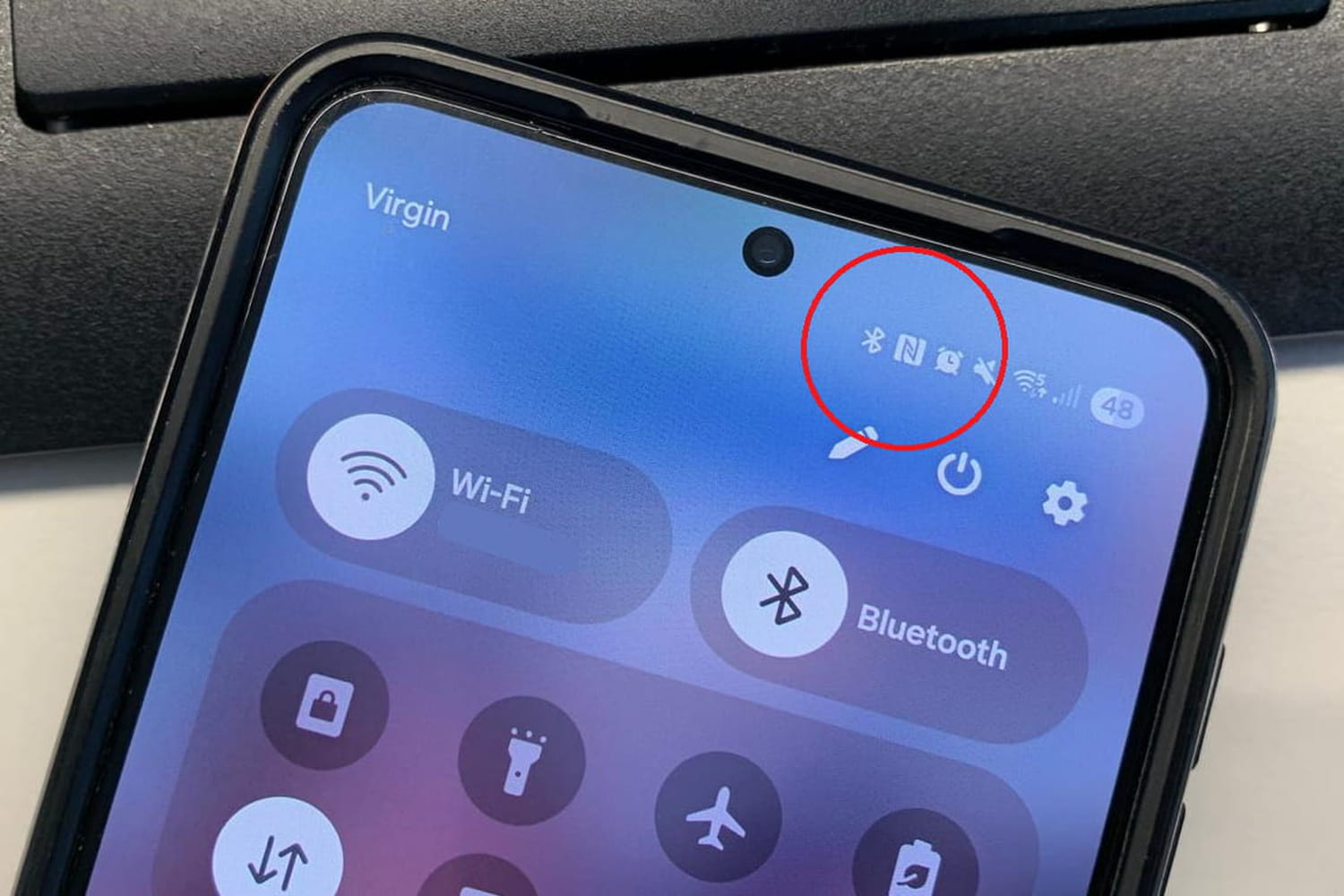
It sometimes appears without warning at the top of the screen, then disappears depending on the model. This little letter “N” intrigues a lot of smartphone users, to the point of triggering thousands of searches on the internet.

We all know that moment when we look at our phone and a new symbol appears without really knowing why. A star, a drop, a padlock, a moon… Smartphones love to communicate with little icons that we often end up ignoring. Except that the famous “N” immediately catches the eye. Firstly because it is very visible, then because it looks more like an error than a useful function. Many then think of a strange update, of an application installed automatically… when other users will not even have noticed it.

On specialized forums, questions come up constantly. “Why do I have an N at the top of my phone?”, “How do I remove it?”, “What is it for?”. But this symbol does not apply to all smartphones. In reality, it is mainly found on Android devices. Moreover, Samsung, Xiaomi, Oppo, Sony, Google and Honor models do not all display this icon in the same way. With some manufacturers, the letter remains permanently visible in the notifications bar. In others, it only appears when opening quick shortcuts. And on some recent models, it has completely disappeared while the function continues to run quietly in the background.

iPhone users are often a little lost when they come across this “N” story, simply because Apple does not show this symbol on the screen. However, iPhones have also used exactly the same technology for several years. The difference is that Apple prefers to manage this discreetly without displaying a permanent icon in the top bar. Result: many Android users discover this function via this famous “N”, while iPhone owners have sometimes used it for a long time without even knowing that it exists.

The meaning of this famous letter “N” is actually very simple: it indicates that NFC technology is activated on the smartphone. NFC, for “Near Field Communication”, allows the phone to communicate with nearby devices, validate certain transport tickets or even make contactless payments. Like Bluetooth or Wi-Fi, it is part of the wireless connections integrated into almost all current phones. Clearly, the smartphone must be placed a few centimeters from another compatible device for the connection to take place.

Contrary to certain ideas still circulating on social networks, it is impossible to trigger a sensitive operation simply by bringing a device close to the phone. To validate an important action, almost always additional authentication with a code, fingerprint or facial recognition is required. And if this icon really annoys you, it is still possible to make it disappear by deactivating the function from the Android settings. The option is usually found in menus related to connections or connected devices.


Share. Facebook Twitter Pinterest LinkedIn Tumblr Email

Related Articles

These vehicles are most often used as radar cars
Culture

These vehicles are most often used as radar cars

14 July 2026
here is the color that gives a feeling of freshness in the house
Culture

here is the color that gives a feeling of freshness in the house

13 July 2026
Stéphane Bern gives a little rant
Culture

Stéphane Bern gives a little rant

13 July 2026
map, glasses, what time in France?
Culture

map, glasses, what time in France?

13 July 2026
Alexandra Leclerc matched her look to that of… her dog! And it’s adorable
Culture

Alexandra Leclerc matched her look to that of… her dog! And it’s adorable

13 July 2026
Between 10 and 15 million French people will receive a transfer this summer: here is the precise date
Culture

Between 10 and 15 million French people will receive a transfer this summer: here is the precise date

13 July 2026
Latest News
The thousand faces of Sam Neill, who could be reassuring and icy, romantic and ruthless

The thousand faces of Sam Neill, who could be reassuring and icy, romantic and ruthless

14 July 20261 Views
Without gratitude no change comes – July 14th

Without gratitude no change comes – July 14th

14 July 20260 Views
Saint Camillus de Lellis, from soldier of fortune to saint of the sick. The story of an extraordinary conversion

Saint Camillus de Lellis, from soldier of fortune to saint of the sick. The story of an extraordinary conversion

13 July 20260 Views

Subscribe to Updates

Get the latest women's news and updates directly to your inbox.

Popular Now
Bordignon: «The single allowance is not a brake on female employment. It must be supported and made universal” Parenting

Bordignon: «The single allowance is not a brake on female employment. It must be supported and made universal”

News Room13 July 2026
Unmatched: Learning Resilience Through Failure Pregnancy

Unmatched: Learning Resilience Through Failure

News Room13 July 2026
ETF, capitalizing or distributing, this choice changes the return of your portfolio in the long term Business

ETF, capitalizing or distributing, this choice changes the return of your portfolio in the long term

News Room13 July 2026
Most Popular
These vehicles are most often used as radar cars

These vehicles are most often used as radar cars

14 July 20260 Views
The thousand faces of Sam Neill, who could be reassuring and icy, romantic and ruthless

The thousand faces of Sam Neill, who could be reassuring and icy, romantic and ruthless

14 July 20261 Views
Without gratitude no change comes – July 14th

Without gratitude no change comes – July 14th

14 July 20260 Views
Our Picks
Saint Camillus de Lellis, from soldier of fortune to saint of the sick. The story of an extraordinary conversion

Saint Camillus de Lellis, from soldier of fortune to saint of the sick. The story of an extraordinary conversion

13 July 2026
here is the color that gives a feeling of freshness in the house

here is the color that gives a feeling of freshness in the house

13 July 2026
Bordignon: «The single allowance is not a brake on female employment. It must be supported and made universal”

Bordignon: «The single allowance is not a brake on female employment. It must be supported and made universal”

13 July 2026

Subscribe to Updates

Get the latest women's news and updates directly to your inbox.

Mumy
Facebook X (Twitter) Instagram Pinterest
  • Privacy Policy
  • Terms of use
  • Advertise
  • Contact
© 2026 Mumy. All Rights Reserved.

Type above and press Enter to search. Press Esc to cancel.